Remote access breaks down fast when people can connect from anywhere but the controls behind that connection are weak. SSL/TLS VPN security is the difference between a usable remote access setup and one that exposes internal apps, credentials, and sensitive data over untrusted networks.
CompTIA N10-009 Network+ Training Course
Discover essential networking skills and gain confidence in troubleshooting IPv6, DHCP, and switch failures to keep your network running smoothly.
Get this course on Udemy at the lowest price →Quick Answer
To implement secure remote access using SSL/TLS VPNs, define who needs access, choose a VPN model, enforce multi-factor authentication, validate device posture, restrict users with least privilege, and monitor everything through logs and alerts. A well-designed SSL/TLS VPN protects confidentiality and integrity while giving distributed teams and contractors controlled access over public or home networks.
Quick Procedure
- Define access requirements by role and application.
- Select an SSL/TLS VPN platform that supports MFA and logging.
- Configure certificates, authentication, and access policies.
- Harden endpoints and enforce posture checks before connection.
- Limit users to specific resources with least privilege.
- Send logs to SIEM and alert on suspicious activity.
- Pilot, test, and roll out access in phases.
| Primary Goal | Secure remote access over untrusted networks as of May 2026 |
|---|---|
| Core Security Controls | MFA, certificate validation, device posture checks, and least privilege as of May 2026 |
| Typical Access Models | Client-based VPN and clientless browser-based access as of May 2026 |
| Key Design Choice | Full-tunnel versus split-tunnel routing as of May 2026 |
| Operational Requirement | Centralized logging and SIEM correlation as of May 2026 |
| Common Use Cases | Employee access, contractor access, and internal web application access as of May 2026 |
Secure remote access is not just “letting users in from home.” It is a controlled access model that protects data, limits exposure, and preserves visibility while people connect from laptops, unmanaged devices, coffee shop Wi-Fi, or contractor networks. For teams studying the networking side through the CompTIA N10-009 Network+ Training Course, this topic ties directly to DNS, routing, switch behavior, and troubleshooting paths that make remote access either reliable or painful.
An SSL/TLS VPN uses encrypted sessions to carry remote traffic across public networks, but encryption alone is not enough. The real work is in the configuration: identity controls, certificate trust, routing choices, endpoint checks, and logging that can stand up in an audit or incident review.
Understanding SSL/TLS VPNs
SSL/TLS VPN is a remote access method that uses the Transport Layer Security protocol to encrypt traffic between a client and a VPN gateway, often on TCP 443. That matters because most networks already allow HTTPS, so SSL/TLS VPNs often pass through firewalls more easily than older remote access designs.
Traditional IPsec VPN solutions usually work at the network layer and are often better for full-tunnel, site-to-site-style connectivity. SSL/TLS VPNs are more flexible for user access because they can support browser-based portals, per-application access, and simpler client deployment. For many organizations, that means fewer help desk calls and better compatibility with modern identity workflows.
Client-based and clientless access
There are two common models. A client-based VPN installs software on the endpoint and creates a protected tunnel for some or all traffic. A clientless VPN or browser-based portal gives access to specific web apps without a full tunnel, which is useful for contractors or one-off tasks.
The right model depends on the use case. A network administrator may need access to internal subnets, while a sales contractor may only need a browser session to a web portal. That difference is why SSL/TLS VPN architecture should start with role-based access, not with vendor features.
Why TLS encryption matters
TLS protects confidentiality and integrity while traffic crosses public Wi-Fi or home broadband. Without it, anyone on the path could potentially observe session contents or tamper with unprotected traffic. The U.S. National Institute of Standards and Technology explains TLS requirements and guidance in its cryptographic and security publications, including NIST Computer Security Resource Center.
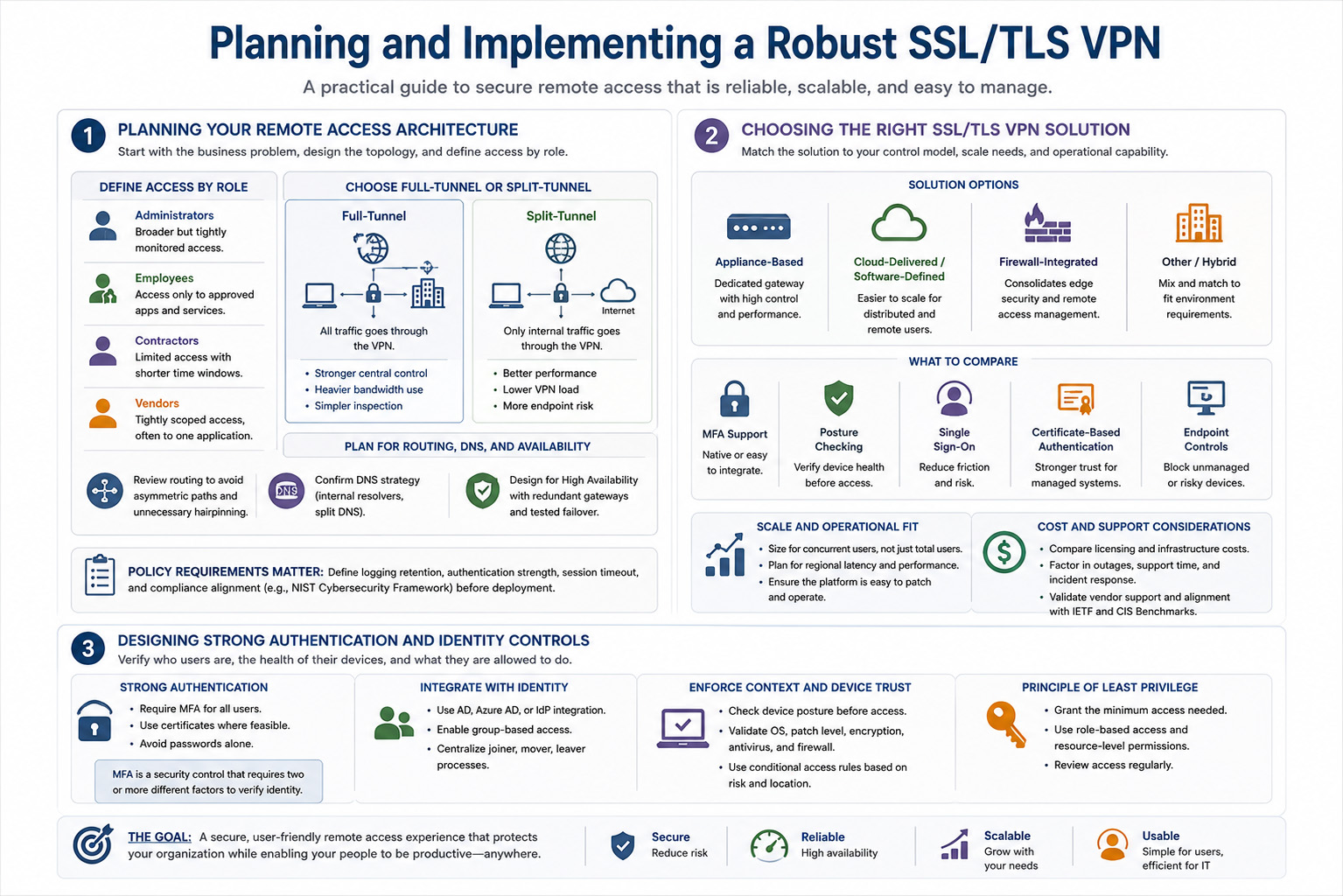
Encryption makes the session private. Identity controls decide whether the connection should exist at all.
Typical use cases include remote employee access to internal applications, contractor access to a limited set of services, and secure access to web apps that cannot be exposed directly to the internet. SSL/TLS VPNs also have a practical advantage: they usually integrate well with identity providers and are easier to traverse through restrictive firewalls than many older designs.
Official guidance and technical context
For protocol background, the IETF TLS standard remains the reference point for how encrypted sessions should behave, and vendor documentation should show exactly which TLS versions and cipher suites are supported. Cisco® documents remote access VPN behavior in its product guides, while Microsoft® documents identity and conditional access patterns in Microsoft Learn. Those official sources are the ones to check before making design decisions.
Planning Your Remote Access Architecture
Planning starts with the business problem, not the appliance. Identify which user groups need access, what applications they must reach, how much latency is acceptable, and whether the connection must survive peak hours, travel spikes, or disaster recovery events. This is where a simple diagram saves days of troubleshooting later.
Network topology is the layout of devices, routes, subnets, and services that determines how traffic moves through the environment. If the VPN gateway lives in a DMZ but DNS still points remote users to internal names that only the campus resolver can answer, the design will fail in ways that look like “VPN issues” but are really routing or name-resolution problems.
Define access by role
Map access to job function. Administrators may need broader access to management subnets, jump hosts, and secure internal tools. General staff usually need only a small set of business applications, such as ticketing, file services, HR portals, or internal dashboards.
- Administrators: broader but tightly monitored access.
- Employees: access only to approved apps and services.
- Contractors: limited access with shorter time windows.
- Vendors: tightly scoped access, often to one application.
That role mapping becomes the basis for VPN groups, access-control lists, and conditional access rules. It also reduces support load because users only see what they actually need.
Choose full-tunnel or split-tunnel
A full-tunnel design sends all user traffic through the VPN, including internet-bound traffic. That gives the security team maximum visibility and keeps DNS, web filtering, and data loss controls in the corporate path, but it adds bandwidth load to the VPN infrastructure.
A split-tunnel design sends only internal traffic through the VPN and lets internet traffic go directly to the internet. That improves performance and reduces central bandwidth usage, but it also shifts more trust to the endpoint and can complicate logging and policy enforcement.
| Full-tunnel | Stronger central control, heavier bandwidth use, simpler inspection |
|---|---|
| Split-tunnel | Better performance, lower VPN load, more endpoint risk |
There is no universal answer. A finance team handling sensitive records may justify full-tunnel access, while a globally distributed workforce may need split-tunnel performance to keep collaboration usable.
Plan for routing, DNS, and availability
Review routing so remote users can reach internal subnets without hairpinning or asymmetric paths. Confirm whether DNS should be pushed from internal resolvers and whether split DNS is needed for internal hostnames. If your gateway is the only path to a critical service, high availability is not optional; it is part of the design.
High Availability is a design pattern that keeps a service reachable when one component fails. For remote access, that often means redundant VPN gateways, shared configuration, synchronized certificates, and tested failover paths.
Policy requirements matter just as much as topology. Define logging retention, authentication strength, session timeout, and acceptable compliance alignment before deployment. The NIST Cybersecurity Framework is useful here because it frames access control, detection, and resilience as operational functions rather than one-time tasks.
Choosing the Right SSL/TLS VPN Solution
The right product depends on where you want the control plane to live and how much operational work your team can absorb. Appliance-based, software-defined, cloud-delivered, and firewall-integrated options all work, but they solve different problems.
Appliance-based VPNs are common when teams want a dedicated gateway with tight control over certificates, routing, and throughput. Firewall-integrated VPNs reduce sprawl because the same platform handles edge security and remote access. Cloud-delivered or software-defined options are often easier to scale for distributed users, especially when the workforce is geographically spread out.
What to compare
Look at feature depth, not just the licensing brochure. MFA support, posture checking, single sign-on, certificate-based authentication, clientless access, and endpoint controls are the features that usually determine whether the deployment is secure or merely functional.
- MFA support: should be native or easy to integrate.
- Posture checking: should evaluate patch level, encryption, and security software.
- Single sign-on: reduces password fatigue and login friction.
- Certificate-based authentication: improves trust for managed systems.
- Endpoint controls: help block unmanaged or risky devices.
Scale and operational fit
Size the platform for concurrent users, not just the user count on paper. A 1,000-user company might only need 150 remote sessions at a time today, but that number can jump during outages, weather events, or policy changes. Evaluate geographic distribution too, because remote users in another region may experience latency if all traffic is forced through one data center.
Operational complexity also matters. A platform that your team cannot patch quickly or troubleshoot cleanly becomes a risk. For vendor support and interoperability expectations, check official documentation from the vendor, and compare it against technical standards from groups like IETF and benchmark guidance such as CIS Benchmarks from the Center for Internet Security.
Licensing and infrastructure costs should be weighed against the security and usability benefits. The cheapest option is not always the least expensive once you factor in outages, support time, and incident response effort.
Designing Strong Authentication and Identity Controls
Multi-factor authentication is a security control that requires two or more different factors to verify identity, such as a password plus a push approval or hardware token. Passwords alone are weak because credential theft, phishing, password reuse, and brute force still account for a large share of account compromise.
The Cybersecurity and Infrastructure Security Agency (CISA) regularly advises organizations to use MFA and modern identity protection because stolen credentials are still a common entry point. That advice applies directly to remote access, where the VPN becomes the front door to internal systems.
Centralized identity and role control
Integrate the VPN with a centralized identity provider such as Microsoft Entra ID, Active Directory, or another supported identity system. Centralized authentication makes it easier to disable accounts, enforce password policy, and apply group-based access rules consistently.
Use role-based access control to map users to the minimum resources they need. A contractor should not inherit the same access profile as a domain admin, and a general employee should not see management interfaces unless there is a documented business need.
Certificates and conditional access
Implement certificate-based authentication for managed devices or privileged users where appropriate. A device certificate adds a second trust anchor that is harder to steal than a password, especially if the private key is stored in secure hardware. That can be a strong fit for administrators, service accounts, or corporate laptops.
Conditional access rules should evaluate device posture, location, login risk, and group membership. If a user signs in from an unusual country, a rooted phone, or a machine without disk encryption, the VPN should require stronger proof or deny access entirely.
Note
Identity is not a single control. Secure remote access works best when MFA, device trust, and least privilege all line up at the same time.
Configuring the VPN for Secure Connectivity
Configuration is where secure design becomes real, and where small mistakes create large problems. Start by generating or importing a trusted server certificate with a complete chain of trust, then verify that remote clients can validate the certificate without warning prompts or self-signed exceptions.
Certificate chain validation is the process of confirming that the server certificate was issued by a trusted authority and that all intermediate certificates are present. If the chain breaks, users may still connect after clicking through warnings, which is exactly the behavior you do not want in production.
Harden protocols and cryptography
Disable weak protocols, old ciphers, and legacy TLS versions. The goal is to remove downgrade paths and known-weak configuration choices, not to keep compatibility with obsolete clients that should have been retired already. Check vendor documentation for supported versions and follow current guidance from NIST and the vendor.
In many environments, TLS 1.2 and TLS 1.3 are the practical baseline, with older protocols disabled unless there is a documented exception. The exact implementation depends on the platform, but the principle is always the same: remove what you do not need.
Set routing, DNS, and access rules carefully
Define which internal networks are reachable through the tunnel and which services are allowed from each user group. Avoid broad “any to any” rules just because they make the first deployment easier. That shortcut becomes expensive later when someone discovers that one contractor account can reach far more than intended.
Configure DNS so remote users can resolve internal hosts consistently. If the VPN client needs to push internal resolvers, test split-DNS behavior carefully so users do not get stale results or public IPs for private services. This is one of the most common causes of “the VPN is connected, but the app still does not work.”
Balance timeouts and usability
Set session timeouts and idle disconnect policies according to risk. Shorter timeouts reduce exposure when a laptop is left unattended, but they can frustrate users if they trigger too often during normal work. Reconnect behavior matters too, especially for mobile workers who move between Wi-Fi and cellular networks during the day.
Document the final settings so the help desk can explain what users should expect. A secure configuration is not useful if nobody can distinguish intended behavior from a misconfiguration.
How Do You Harden Endpoints and Enforce Device Posture?
You harden endpoints by making sure only trusted, healthy devices can connect and stay connected. That means up-to-date operating systems, current patches, supported browsers or VPN clients, disk encryption, and local firewall settings that reduce the chance of compromise.
A posture check is a policy evaluation that decides whether a device is compliant enough to access resources. It can look for antivirus or EDR status, jailbroken or rooted indicators, missing patches, or the absence of required security settings.
Build a minimum device standard
Set a baseline for managed devices: current OS version, supported endpoint protection, disk encryption, and device management enrollment. If the VPN can query endpoint state, use that data to block or limit access for noncompliant endpoints rather than giving them the same trust as corporate laptops.
Managed and unmanaged devices should follow different policies. A personally owned tablet may be allowed to reach a web portal, but not an internal admin console. That distinction keeps productivity high without turning every device into a trusted endpoint.
- Managed device: full policy enforcement, stronger access.
- Unmanaged device: limited access, tighter monitoring.
- Noncompliant device: block, quarantine, or restrict heavily.
Use supporting controls
Endpoint detection and response tools, local firewall rules, and disk encryption all reduce the risk that a compromised device turns into a VPN breach. If a remote laptop is infected, the VPN should not extend implicit trust just because the user knows a valid password.
The NIST endpoint security guidance and the CIS Benchmarks are good references for hardening the device side. Endpoint control is not separate from remote access; it is part of the same trust decision.
How Do You Segment Access and Apply Least Privilege?
Least privilege means giving users only the access required to do their job, nothing more. In remote access, that usually means limiting users to specific applications, subnets, or internal services instead of opening the entire network.
Segmentation is what keeps one bad credential from turning into full internal exposure. If a contractor account is compromised, the attacker should hit a narrow wall, not a broad corridor with access to finance systems, domain controllers, and management interfaces.
Use application-level access where possible
When a user only needs one internal web app, expose that app through a controlled VPN profile or a clientless portal rather than opening the whole subnet. This reduces lateral movement and makes logging more meaningful because the user’s activity is tied to one service rather than to a broad internal network.
Create separate access profiles for employees, contractors, vendors, and administrators. Administrative interfaces should sit behind extra controls such as jump hosts, privileged access workflows, or additional MFA checks.
Pair segmentation with network controls
Microsegmentation, VLAN-based controls, and firewall policies can all reduce what a remote user can reach once connected. If identity controls fail, segmentation becomes the backstop that limits the blast radius.
Regularly review entitlements to remove stale access, unused group memberships, and shadow permissions. The fastest way to weaken a remote access program is to leave old access profiles in place long after jobs have changed.
Good remote access design assumes credentials will be abused eventually and limits the damage when that happens.
For context on role and workforce expectations, the NICE Workforce Framework is useful because it ties tasks to job functions and helps justify why different users need different access levels.
Monitoring, Logging, and Threat Detection
Monitoring remote access means collecting enough data to answer three questions quickly: who connected, from where, and what they touched. Enable logs for authentication attempts, session activity, resource access, certificate use, and configuration changes so investigators can reconstruct events without guessing.
Forward VPN logs to a SIEM, which is a security platform that correlates logs from multiple systems to detect threats and investigate incidents. A VPN log by itself tells a small story; a VPN log combined with identity, endpoint, and network telemetry tells the real one.
Watch for suspicious patterns
Create alerts for repeated login failures, impossible travel, unusual access times, abrupt geography changes, and session spikes. These are not proof of compromise by themselves, but they are the kinds of signals that deserve attention when they appear together.
- Impossible travel: one account signs in from distant locations too quickly.
- Repeated failures: brute force or password-spraying indicators.
- Odd timing: access outside normal working hours.
- Rare destination: access to systems a user rarely touches.
Retain and correlate data
Keep logs long enough to support incident response, legal review, and compliance obligations. The exact retention period depends on policy and regulation, but the principle is simple: if you cannot reconstruct the session, you cannot investigate the session.
The Verizon Data Breach Investigations Report continues to show that credentials and human behavior are still major factors in breaches, which is exactly why remote access logs matter. Treat the VPN as part of the detection stack, not just a connection service.
Testing, Deployment, and User Rollout
Roll out the VPN in phases. Start with a pilot group that includes a few ordinary users, one or two power users, and a support contact who can report issues clearly. That mix catches both obvious setup problems and the subtle ones that show up only when real people use the system.
Pilot testing is the fastest way to find routing errors, certificate problems, and MFA friction before they affect the entire workforce. It is much cheaper to fix a split-tunnel rule for 20 users than for 2,000.
What to test before broad rollout
Verify certificate validation, MFA flows, split-tunnel behavior, DNS resolution, failover, and access to each critical app. If the VPN supports mobile users, test reconnect behavior when the device changes networks or sleeps and wakes.
- Validate authentication with real accounts and real MFA prompts.
- Test routing for each internal subnet and application.
- Confirm DNS resolves internal names correctly.
- Simulate failover by taking one gateway or link down.
- Measure performance under normal and peak conditions.
Prepare users and the help desk
Document client installation, login steps, common errors, and escalation paths. Include screenshots if the client is user-facing, because “click the icon in the tray” is not enough when the system tray is hidden or the user is on a different OS build.
Train users to avoid public devices, watch for suspicious prompts, and report unexpected certificate warnings. A user who knows what normal looks like is much less likely to click through a fake login page or ignore a warning that matters.
The Bureau of Labor Statistics Occupational Outlook Handbook remains a useful source for understanding how networking and security roles are growing, but the operational lesson here is simpler: train early, test broadly, and roll out in stages so the support burden does not explode.
What Are the Common Mistakes to Avoid?
The most common remote access mistakes are predictable and avoidable. Weak passwords, skipped MFA, overly broad access, and stale certificates are all problems that keep showing up because teams prioritize speed over control during deployment.
One bad assumption is that encryption equals security. A VPN can encrypt traffic perfectly and still be unsafe if the gateway trusts unmanaged devices, exposes broad internal routes, or logs nothing useful.
Watch for these failures
- Skipping MFA: passwords alone are not enough.
- Granting full network access by default: broad trust creates broad risk.
- Leaving weak TLS settings enabled: outdated protocols invite downgrade abuse.
- Poor certificate management: expired or mismatched certs break trust.
- Neglecting logs and patching: you cannot secure what you do not maintain.
Do not leave default settings in production just because the system works after first install. Default access rules are often far too open, and outdated firmware may contain known issues that attackers already understand better than defenders do.
Warning
A working VPN is not the same as a secure VPN. If MFA, logging, and certificate management are weak, remote access becomes a high-value attack path.
Best Practices for Ongoing Maintenance
Secure remote access is a maintenance program, not a one-time project. Patch VPN gateways, clients, and supporting infrastructure on a regular schedule, and keep a clear process for change approval so certificate renewals and firmware updates do not surprise users.
Review access policies periodically to remove unused accounts, stale certificates, and privileges no one needs anymore. The older a remote access environment gets, the more likely it is to accumulate exceptions that no one remembers creating.
Keep the control set current
Reassess cryptographic settings as standards evolve. What looked strong three years ago may no longer be the best choice now, especially when vendor guidance changes or new attacks emerge. If a platform supports stronger defaults, use them.
Conduct penetration tests, configuration audits, and tabletop incident exercises to validate the design. A tabletop exercise that starts with “a contractor account was compromised” is often the fastest way to discover missing logging, weak segmentation, or unclear escalation paths.
Govern the process
Maintain change management for policy updates, certificate renewals, and feature upgrades. That includes documenting who approved the change, what was altered, how it was tested, and how it will be rolled back if needed.
The COBIT governance framework is useful because it reinforces control, monitoring, and accountability. For organizations in regulated sectors, that governance layer matters as much as the technical configuration.
Remote access becomes reliable when it is treated like a living service. The teams that stay ahead are the ones that review, patch, test, and tune continuously instead of waiting for a failure to trigger action.
Key Takeaway
- SSL/TLS VPNs secure remote access only when encryption is paired with identity, posture, and least privilege.
- MFA is mandatory for remote users because passwords alone are too easy to steal or reuse.
- Split-tunnel and full-tunnel are design choices, not defaults; each has real security and performance tradeoffs.
- Logging to SIEM turns VPN activity into actionable detection and investigation data.
- Maintenance matters as much as deployment because certificates, patches, and policies age quickly.
CompTIA N10-009 Network+ Training Course
Discover essential networking skills and gain confidence in troubleshooting IPv6, DHCP, and switch failures to keep your network running smoothly.
Get this course on Udemy at the lowest price →Conclusion
Secure remote access depends on more than strong encryption. SSL/TLS VPN security works best when it is built around trusted identity, managed endpoints, segmented access, and monitoring that can catch abuse early.
The practical approach is straightforward: start with a clear access model, enforce MFA, validate device posture, restrict users to the minimum necessary resources, and keep a close eye on logs and anomalies. That is the difference between a remote access service that merely connects and one that actually protects the business.
If you are building or reviewing a remote access design, use the same discipline you would apply to routing, switching, and IP services. That is why the CompTIA N10-009 Network+ Training Course is a useful foundation for this work: the operational details behind SSL/TLS VPNs live in the same networking fundamentals that make everything else hold together.
Start with one change this week: tighten your access model, verify your certificates, and confirm that every remote session is visible in logs. Then keep going.
CompTIA®, Network+™, Microsoft®, and Cisco® are trademarks of their respective owners.
